

You open today’s workout and the bench press card says 190 for 5. Last time it said 185. The app decided a 5 pound bump. Fine. But why? When it feels accurate we don’t question it much but if it feels wrong for whatever reason, it starts to nag at us. If it happens a few times, we start to quietly lose trust in what the app is telling us to lift.
Most workout apps with some kind of automatic progressive overload built in don’t show you much of the why behind the what. They quietly change your number and the reason largely stays hidden from you. So you either take it on trust or just type over it with your own.
We think this is a big gap and the next Trainlike update is about closing it.
The number looks wrong, and nothing says why
Spend an hour reading what lifters say about apps that pick their weights for them and two complaints come up together. The first is that the number is wrong or seems wrong. Too light to matter, too heavy to finish, or lower than last week for no reason anyone can see. Often it is wrong. Sometimes it only looks wrong, because the app knows something the lifter has forgotten.
The second complaint is the one that underpins the fist…nothing on screen says why. So there is no way to tell a bad number from a surprising but accurate one. A black-box is fine up until the moment that someone questions it.
That second complaint is the one that costs apps their users. A wrong number with its reasoning on screen is a thing you can argue with and correct. A wrong number with no reasoning is a reason to stop believing any of them, including the right ones.
A few apps have started to provide a bit more insight into how their progression systems work. Some publish their rule. One or two now show the data behind a suggestion, which is better. What we have not seen is the lifter’s own sets marked against what was asked, so the set or sets that earned the verdict and the set that cost it are visible at a glance. That is the step we took.
The chip and the sentence
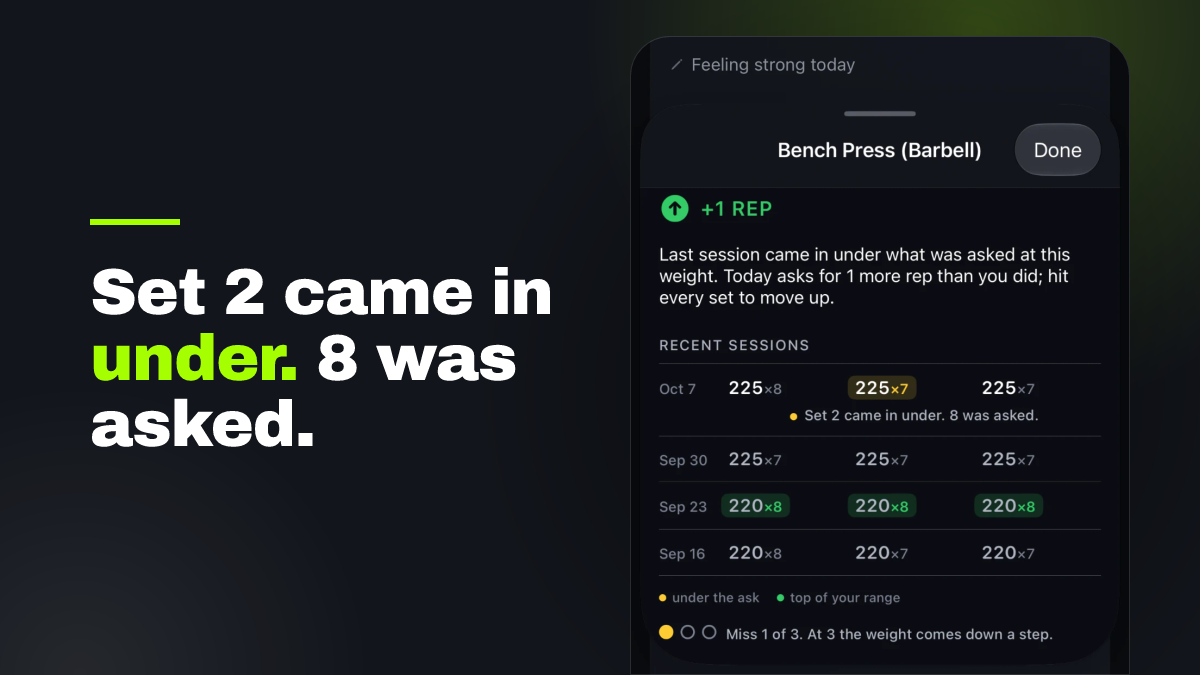
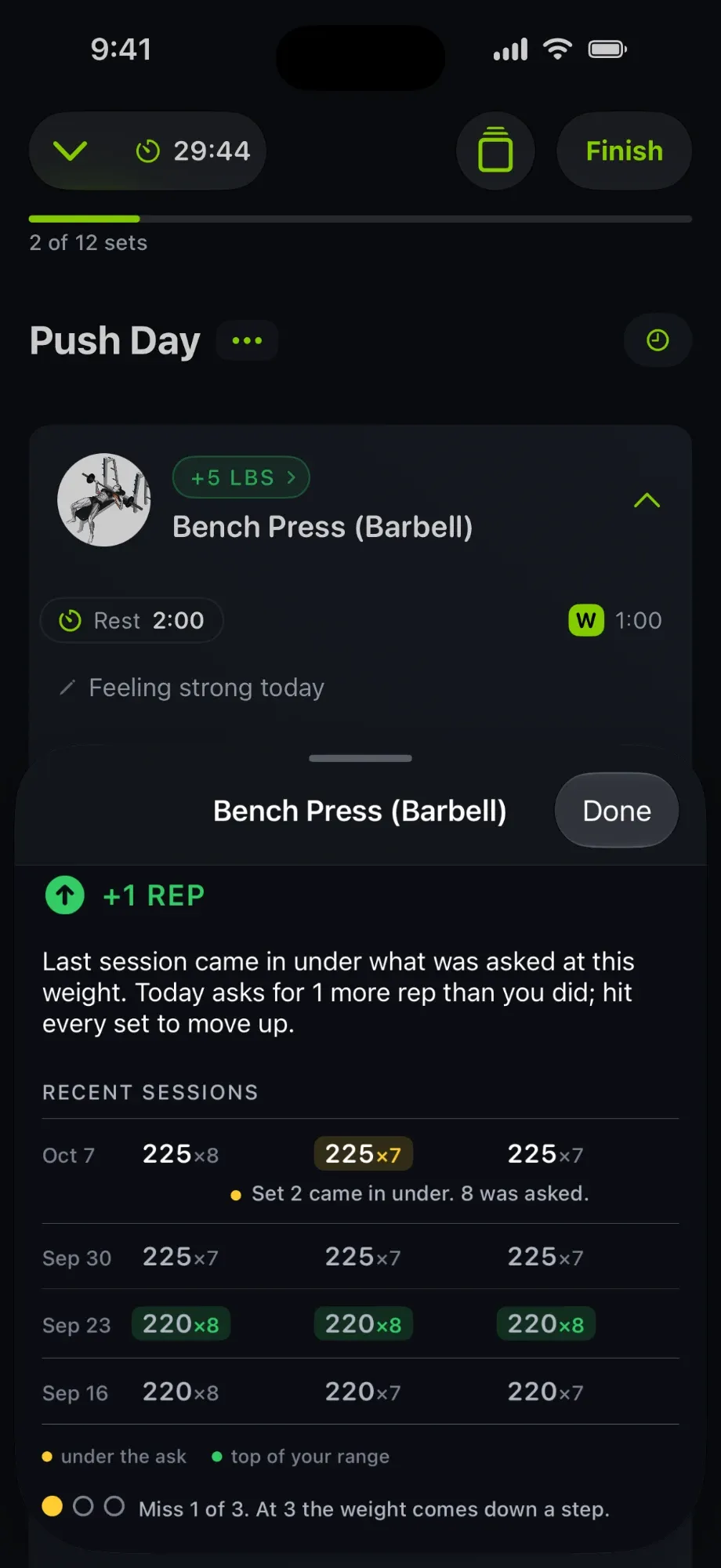
Every exercise card, when progression is on, workout carries a chip: +5 LBS, +1 REP, SAME AGAIN, −10 LBS, etc. It states one thing: how today’s ask compares with what you did last time at that exercise.
Tap the chip and a sheet opens with one plain sentence and your recent workouts at that exercise. A typical sentence: “You hit every set last time, so today asks for 1 more rep than you did. Once every set reaches the top of your range, the weight goes up.”
The rows mark the evidence
The recent-workout rows now carry the evidence for what the engine decided.
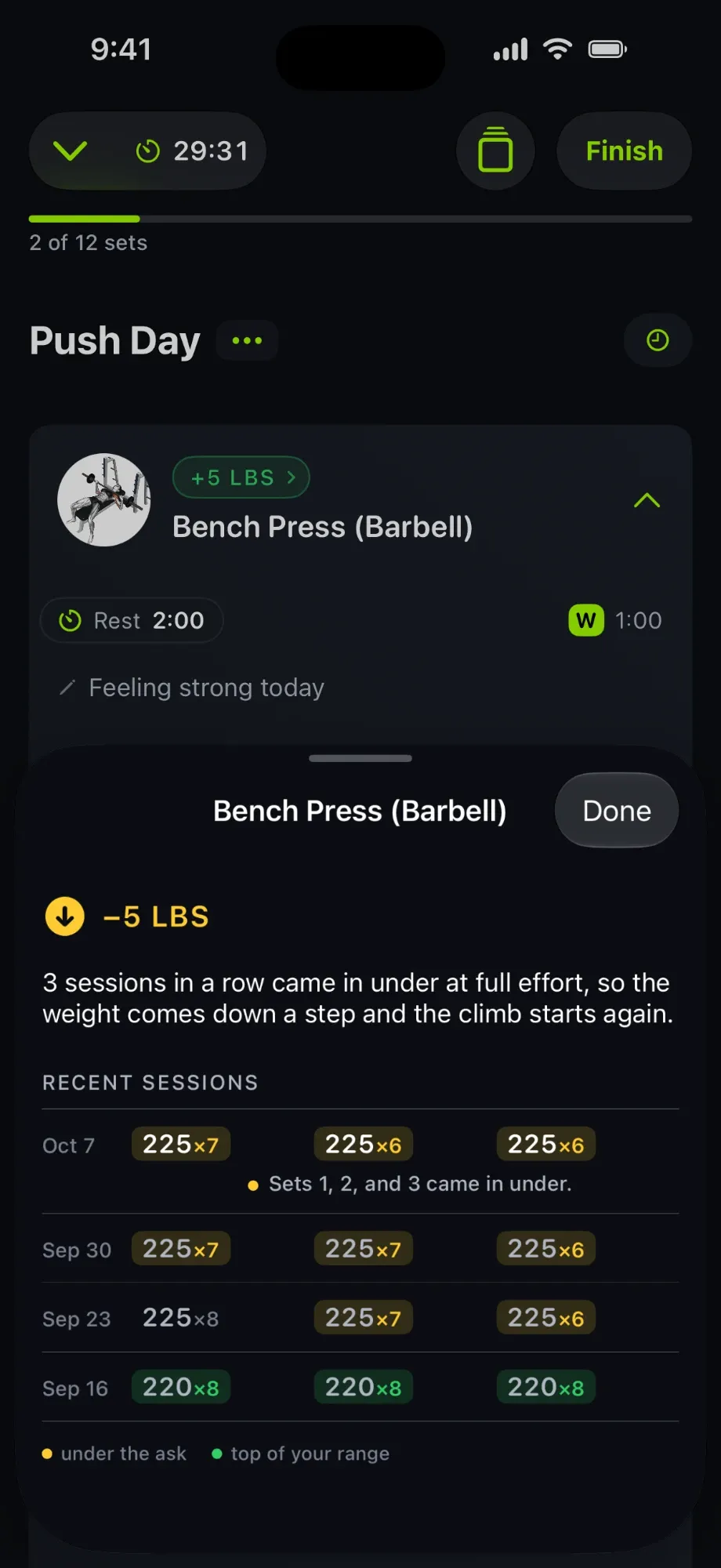
- A set that came in under what was asked is tinted amber.
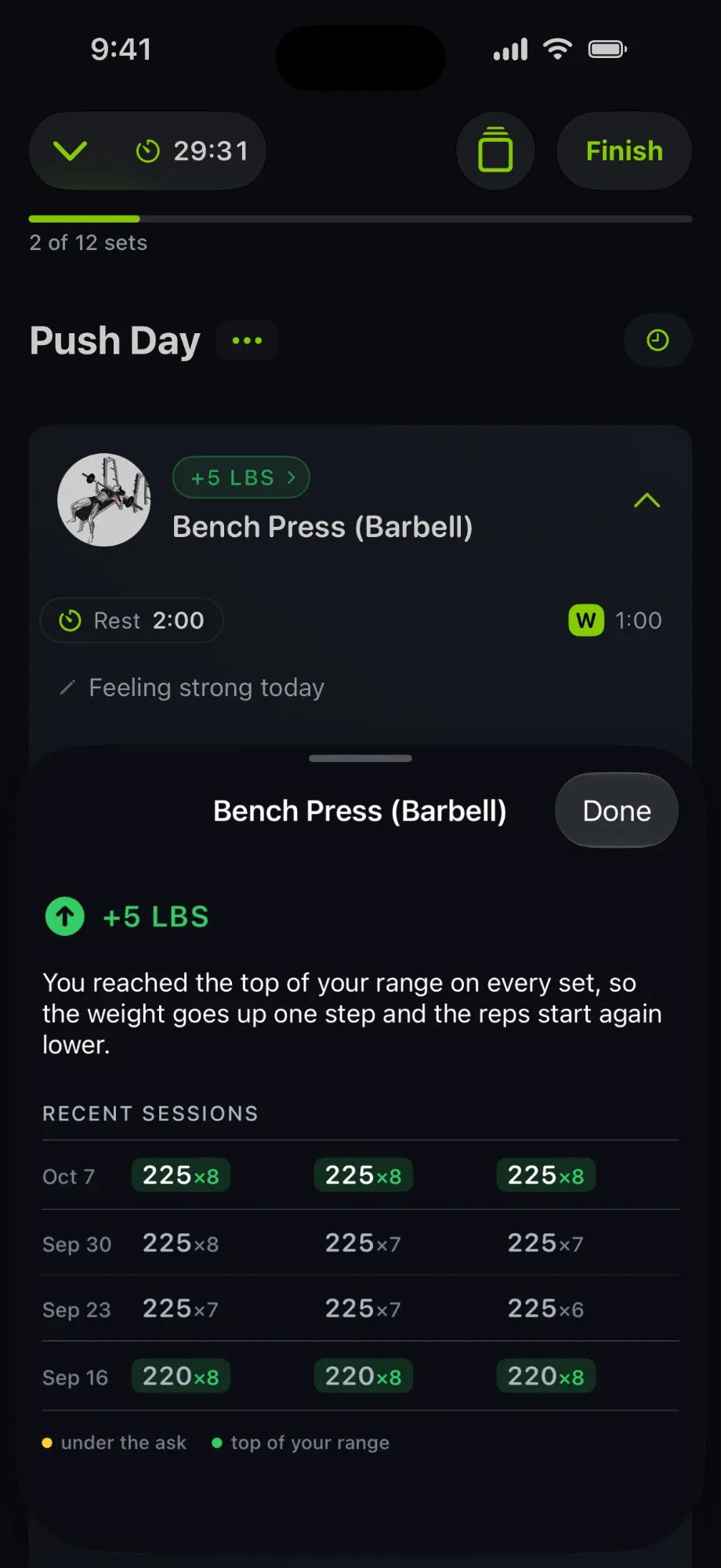
- A set that reached the top of your rep range is tinted green.
- One line under the newest workout names the set: “Set 2 came in under. 8 was asked.”
- Three dots show where you stand: “Miss 1 of 3. At 3 the weight comes down a step.”
- Four decisions that used to get the generic line now have their own sentence: the weight step down after three misses at full effort, the weight pulled back after a hard-rated miss, the jump when you move to a lower rep range, and the hold on your first workout back after time off.
Here it is across three workouts on the bench press, 225 lb, 6 to 8 reps.
One set short. Last time the app asked for 8, 8, 7 and you did 8, 7, 7. Today it asks for the same 8, 8, 7 again. Nothing is added after a miss. The chip says +1 REP because that is one rep more than you actually did. Tap it and it shows which set came in under and what was asked. Hit every set and you move on. Two more misses in a row and the weight comes down a step.
Every set at the top. Three green cells at 225 for 8. The weight goes up a step and the reps start again lower. The green is the evidence for the sentence above it.
Three misses. Three rows with amber at 225. The weight comes down a step and the climb starts again. No dots this time, because the count has reset. The rows tell the story on their own.
In each case you know three things without decoding anything: why the weight did or did not move, which sets counted, and what happens next.
Those are the three you’ll see most weeks. The same rules also handle the rest of real training without you doing anything: time away eases you back in and starts over after a long break; an exercise done second for a muscle is asked for a little less than when it’s fresh; pyramids and reverse pyramids progress on their top set; push-ups and assisted machines progress on reps and on help instead of weight; pick your own weight and the plan follows you the same day; change your rep range and the weight is re-worked for it; rate your effort and it can tell a hard plateau from a session you coasted; and a new exercise starts from what you already lift on related ones. You just do the sets.
Why this is the whole point
Part of our brand promise is ‘progress that makes sense’. We wanted a user to be able to look at any number the progression engine produces and be able to answer ‘why’ in just a tap. Inevitably there will be disagreement. No automatic progression system is going to work for every lifter (we’ll be working on configurability too). But if you can at least see the why behind the what and even if you disagree with the what, it’s a conversation worth having not a broken trust shattered by silence.
Look for it in the next update. Open a workout and tap any chip.